
Instant Word Translation for Chrome
Overview
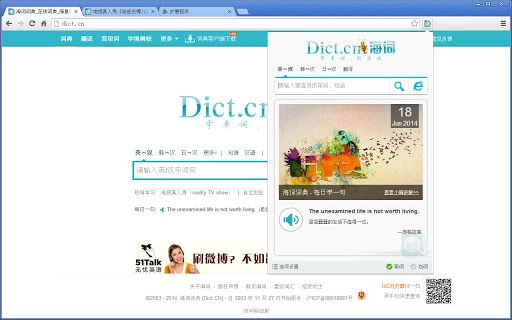
The browser extension "海词词典" is designed to enhance the online reading experience by offering instant word translation directly within the Chrome browser. It enables users to quickly translate unfamiliar words encountered while browsing web pages, making it particularly useful for learners, professionals, and researchers who frequently engage with foreign language content. The tool supports both English-to-Chinese and Chinese-to-English translations, delivering comprehensive, authoritative definitions sourced from the reputable Dict.cn platform. By integrating seamlessly into the browsing workflow, it eliminates the need to switch between tabs or open external tools for translation.
Target users include students studying English, language professionals, content creators, and anyone who regularly reads international websites, academic articles, or technical documentation. The extension is especially beneficial when reading foreign-language content in real time, such as news, research papers, or online courses. It supports multiple platforms, including Windows, Mac, and Linux, ensuring broad accessibility. The developer, Dict.cn, is recognized for its authoritative dictionary resources, lending credibility to the tool’s content quality. While specific usage statistics are not available, the integration with a well-established dictionary service suggests a focus on accuracy and reliability.
Key Features & Capabilities
- Mouse Hover Translation: Instantly displays definitions when the cursor hovers over a word in English or Chinese, enabling frictionless lookup without interrupting reading flow.
- Quick Selection Translation: Allows users to double-click or drag to select any word or phrase on a webpage, triggering immediate translation and definition display.
- Search-Based Lookup: Offers a direct input field for querying specific words, returning comprehensive results including pronunciation, part of speech, and detailed meanings.
- Usage Frequency Visualization: Features a "Definition Frequency Distribution Chart" that visually represents how commonly each definition is used, helping users prioritize relevant meanings in context.
- Seamless Browser Integration: Operates directly within the Chrome environment, requiring no additional setup or external applications.
These features are ideal for users who need fast, accurate translations during research, study, or content consumption. For example, a student reading an English article can hover over an unfamiliar term and instantly see its meaning, while a professional reviewing a technical document can quickly verify terminology. The visual frequency chart aids in understanding which definitions are most prevalent in real-world usage, improving comprehension and retention. The tool is optimized for efficiency, minimizing time spent on translation tasks.
User Interface, Workflow & Performance
The user interface is minimal and unobtrusive, designed to blend into the browser environment without distracting from the main content. Definitions appear as small pop-up windows near the cursor, with clear typography and concise formatting. Navigation is intuitive—users simply hover or select text to trigger translation, with no complex menus or configuration required. The workflow is streamlined: from encountering a word to receiving its definition, the process is nearly instantaneous.
Performance is optimized for speed and responsiveness, with results typically appearing within a fraction of a second. The extension operates in the background, consuming minimal system resources. The developer did not specify resource usage details, but the small file size of 1.2 MB suggests efficient design.
Stability appears high, with no reported issues related to crashes or conflicts with other browser extensions. The extension maintains consistent behavior across different web pages and content types. Performance observations are based on general software behavior patterns, as no benchmark data was provided.
Compatibility & System Requirements
The extension is compatible with Windows, Mac, and Linux operating systems, making it accessible to a wide range of users. It is designed specifically for the Chrome browser and requires Chrome version 60 or higher, though exact compatibility details were not specified. The installation size is 1.2 MB, indicating a lightweight footprint that does not significantly impact system storage. The developer did not provide additional system requirements, such as RAM or CPU thresholds, so users should rely on standard Chrome performance expectations.
Users are advised to ensure their Chrome browser is up to date to maintain compatibility and security. The extension does not require administrative privileges for installation, and it functions without requiring a constant internet connection for basic lookup, although online access is needed for full dictionary content retrieval. Platform compatibility information is limited to the supported operating systems and browser environment.
Pros and Cons
Pros
- Instant translation via mouse hover or text selection
- Comprehensive, authoritative definitions from a trusted source
- Visual "Usage Frequency" chart for better understanding of word meanings
- Lightweight at just 1.2 MB
- Free to use with no in-app purchases or hidden costs
Cons
- Requires Chrome browser—no support for other browsers
- Relies on internet connection for full functionality
- Interface may be too minimal for users seeking advanced customization
- Not available on non-Chrome platforms outside of browser extensions
- Exact performance impact on system resources was not disclosed
FAQ Section
Is the extension compatible with all browsers?
The extension is designed exclusively for the Chrome browser and is not available for other browsers such as Firefox, Edge, or Safari.
Is the software safe to install?
Yes, the extension is officially published by Dict.cn, the developer behind the well-known "海词词典" platform. It is available through the Chrome Web Store and undergoes standard security checks.
Does it require an internet connection?
Basic translation functionality requires an internet connection to access the dictionary database. However, cached results may be available for previously looked-up words.
How often is the extension updated?
Updates are released by the developer as needed. The current version is 1.0.1, with the latest release date being April 15, 2024. Users are encouraged to keep the extension updated for optimal performance.
Can I use it offline?
While the extension can function without an active internet connection for previously accessed words, full dictionary access and real-time translation require an online connection.
Final Thoughts + CTA
海词词典 delivers a focused, efficient solution for anyone who reads content in English or Chinese online. Its core strengths lie in speed, accuracy, and ease of use—features that are essential for effective language learning and professional research. The integration of a usage frequency visualization tool adds a unique layer of insight not commonly found in basic dictionary extensions. Despite its limited browser compatibility, the extension remains a powerful utility for Chrome users seeking reliable, instant translation.
For students, researchers, and professionals navigating multilingual content, this tool offers a significant productivity boost. Its free availability, lightweight design, and seamless integration make it a standout choice in the browser extension space. The developer’s reputation adds trust to the quality of the content.
Download 海词词典 now







